Finding duplicate semantic models in Power BI and Fabric
- Pedro Smiderle
- 11. Feb.
- 4 Min. Lesezeit

Aktualisiert: 10. März
The challenge
We have all seen it, semantic models being built from the same data source containing almost the same tables and columns.
Over time in every organization due to data silos, a lack of permissions or just not knowing that a model alreaday exists, teams create new models creating redundancy.
The result is a growing number of models that are very similar but nobody knows that these mnodels are (almost) duplicates of one another. Only if we compare the semantic model in a qualitative way (comparing every table with all columns, relationships etc.) we could find out how similar they actually are.
Why other comparison methods fall short
One of the few available ways to compare two Power BI semantic models is by looking at their TMDL representation. While this approach can provide useful information, it also requires a lot of work to determine all the differences between two models and and the process usually only works for comparing two models at a time.

This approach does not scale very well, nor does it provide a clear, objective way to identify how similar two models actually are.
The solution: Model Similarity in Measure Killer
This is why we developed a new tool inside Measure Killer, called Model Similarity. It is designed specifically to tackle this kind of problem, using all the metadata Measure Killer collects on the semantic models to compare them in a very intricate and customizable way.
Model Similarity evaluates models across multiple attributes and assigns a similarity score to each comparison. This score shows how closely two models resemble each other, while still allowing users to drill into the exact differences that contribute to that score.
The comparison includes attributes like:
Name
Size
All measures
All tables
All columns
All UDFs
All relationships
And many other traits
You can choose which attributes to take into account and different weights can be set to rank their importance. This allows comparing multiple semantic models in a lot of different ways.
How to use Model Similarity
To access this feature, select either the Tenant Analysis or Limited Tenant Analysis modes and analyze all semantic models (in the selection tab) you want to compare. Afterwards, click on the "Model similarity" button located on the top:
This button will only be enabled if you ran a model in the Selection tab before.

This will open another window, where you can select the semantic model(s) to find duplicates for. In our case we want to see how similar the Sales Report is to all other models we have access to.

In the next window, you will be able to select which semantic models we want our Sales Report to compare to.

Interpreting the results
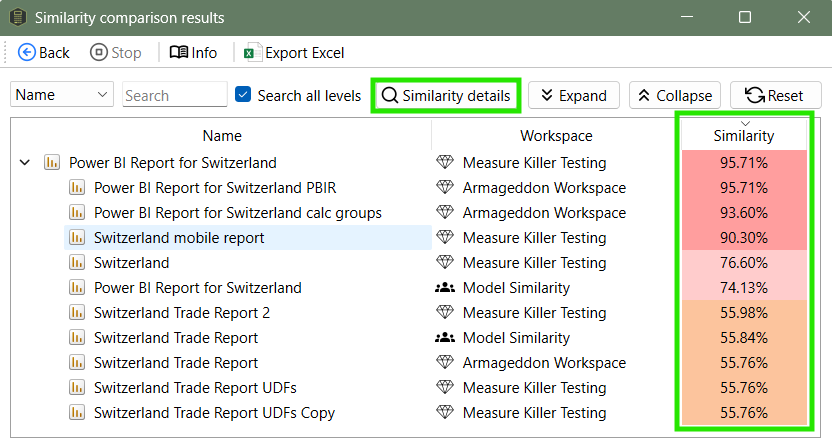
After this, Measure Killer will run the similarity analysis and assign a similarity score between two models. The higher the score, the more similar the models are. Now we can click on Similarity details, to see what exactly makes up the score and what is the same and what is different for the models I selected.

Similarity scores use a red-to-green color scale, with red signaling high similarity, which is typically a bad sign. In this example, the Sales Report model has a very similar model called Sales Report', that resides in the same workspace:

Now it gets interesting, we can see that a lot of things are exactly the same (100% similar) between the two models (Value A and Value B show the respective values or number of artifacts, e.g. for Relationships for each model)
Measure Killer also shows us that the Sales Report has two extra calculated tables and one extra measure compared to the other semantic model.
When we expand the measures we can see which measures those are.

When comparing our Sales Report to another model, in this case Sales Report 1, it is showing us a few differences for tables and columns.

To change the weights we use to calculate the similarity score or to choose only some parts to compare, simply click on "Adjust weights" in the window earlier (you might have to go back a few times)

Here, the weights can be customized:

Conclusion
Model Similarity provides an easy and customizable way to understand how semantic models compare to each other. By combining quantitative similarity scores with detailed comparisons, it aids the user to make informed decisions about which models to consolidate.
If you want to try out the full version of Measure Killer, you can request a trial here.


Kommentare