 Brunner BI

Trigger instant refreshes of Power BI Datasets with Power Automate
Eliminate the 30-minute gap between Dataflow and Dataset refreshes by using Power Automate to trigger instant dataset refreshes.
 Gregor Brunner
Some of you might know this annoying gap in the Power BI refresh cycle between Dataflows and Datasets.
The scheduled refresh can only be set to full hours or 30min intervals.
If you want to refresh the Dataflow at 08:00 AM, you have to set the Dataset refresh at 08:30 AM.
For some customers this ~30min gap creates headaches.
Microsoft has a pretty cool solution though. Just use Power Automate (formerly Microsoft Flow).
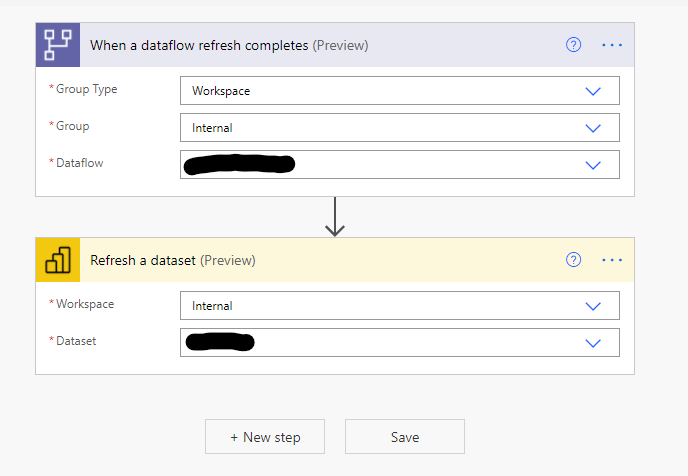
It only takes a few minutes to create this automated cloud flow:
As you can see, Power Automate automatically triggers the refresh for the Dataset once the refresh for the Dataflow has completed.
Power Automate is not free and some might argue that they want you to pay for solving a problem they created in the first place. But hey, let’s just be happy there is a solution.