 Brunner BI

Services
What we can help you with
From a two-day lineage assessment to building a whole solution, we scope each engagement to what you actually need. Power BI and Fabric is all we do.
Power BI and Fabric development
Semantic models, reports and Fabric solutions built the way we would want to maintain them ourselves, plus apps and AI-built dashboards for what a report cannot do.
-
 Power BI
-
 Microsoft Fabric
-
 Fabric Apps
- Semantic models: star schemas, DAX, calculation groups, hybrid tables
- Reports, paginated reports and embedded solutions on small Fabric capacities
- Power Query and dataflows that keep query folding intact
- Fabric lakehouses, warehouses and notebooks
- Fabric Apps and AI-built dashboards (with Claude) for interactive, app-like analytics
- Integrations such as Jira, Data Activator alerts and Power Automate refreshes
Data lineage and impact analysis
Know what breaks before you change it. We trace every column from the database through Power Query, dataflows and semantic models all the way to the visuals that use it.
- Power BI
- Microsoft Fabric
-
 Databricks
-
 Snowflake
-
 PostgreSQL
-
 Measure Killer
- End-to-end column lineage from SQL Server, Azure SQL, PostgreSQL, Snowflake, Databricks and Fabric to Power BI visuals
- Impact analysis before a schema change, a model refactor or a migration
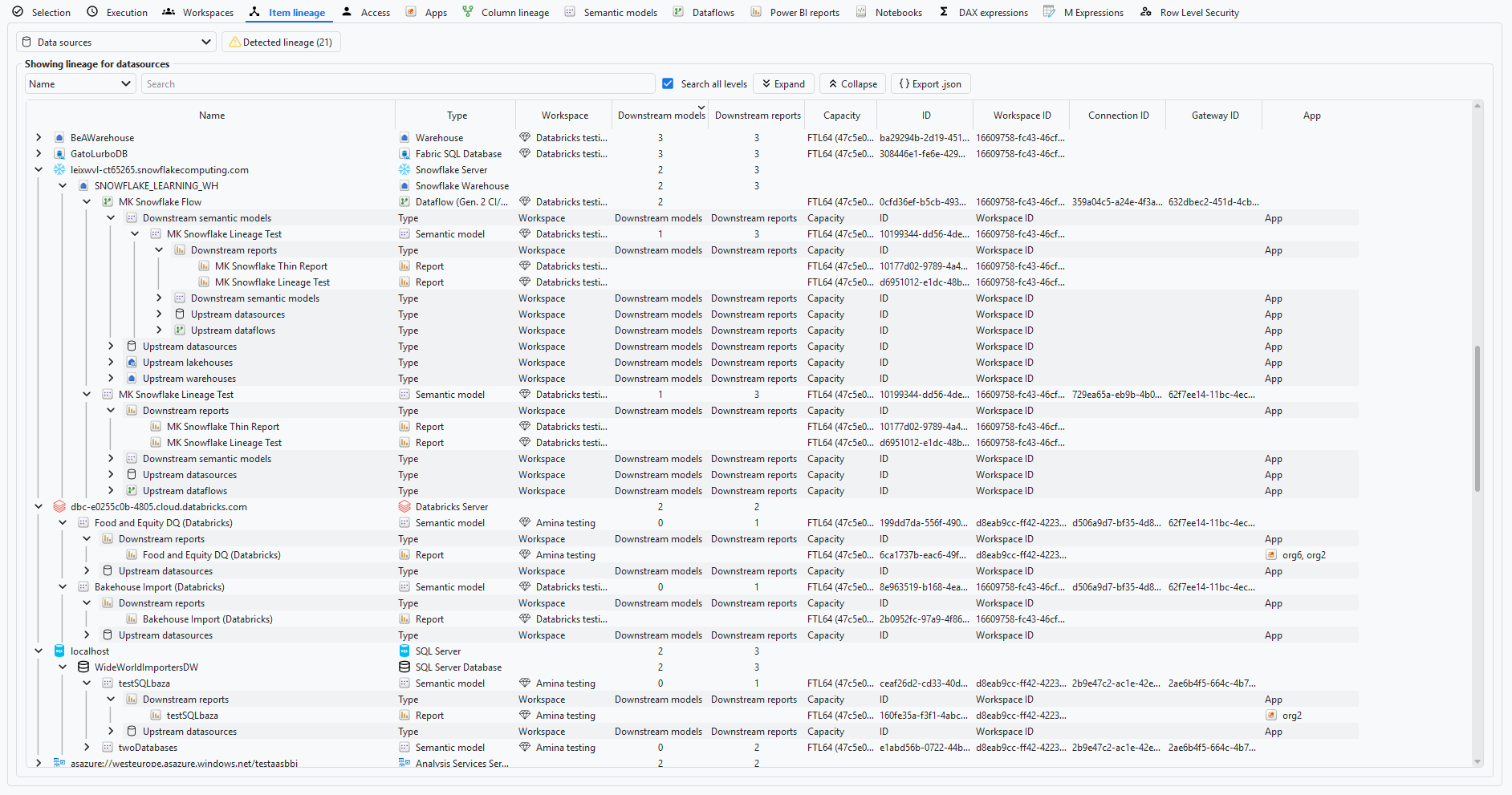
- Tenant-wide item lineage across workspaces, downstream models, paginated reports and Excel
- Lineage pushed into Databricks Unity Catalog, Snowflake and OpenLineage tools
- Closing the gaps of the built-in lineage view and impact analysis
-
 SQL Server
- Azure SQL Database
- PostgreSQL
- Snowflake
- Databricks
- Fabric Lakehouse
- Fabric Warehouse
- Fabric SQL Database
-
 Excel files
Also traced: dataflows Gen1, Gen2 and Gen2 CI/CD, and semantic models built on other semantic models. Excel files work from SharePoint too.
Governance and tenant monitoring
A clear picture of your whole Power BI and Fabric tenant: what exists, who can see it, who uses it and what it costs, and a routine to keep it that way.
- Power BI
- Microsoft Fabric
- Measure Killer
- Inventory of every workspace and item, with owners and last activity
- Access and permissions audits, down to users and security groups
- Usage and adoption: report opens, page views and load times
- Capacity (CU) cost tracking with history beyond Microsoft's 14 days
- Broken visuals, broken DAX, duplicate models and reports, personal workspaces
- Scheduled scans in your own Fabric tenant with MK Automation, set up by us
Optimization and cleanup
Smaller models, faster reports and lower capacity bills. We find what is unused, duplicated or expensive, and remove it safely.
- Power BI
- Microsoft Fabric
- Measure Killer
- Unused columns, measures and tables removed without breaking a single report
- Model size and refresh time reduction
- DAX and report performance, including load times per page
- Refresh and capacity cost comparisons, such as Dataflows Gen1 versus Gen2
- Best-practice reviews for models and reports, tenant-wide
Governance on autopilot
MK Automation, set up in your tenant
When governance has to run every week and not just once, we install MK Automation in your own Fabric tenant. It scans on your schedule, keeps a history beyond Microsoft's retention windows and pushes Power BI lineage into Databricks Unity Catalog, Snowflake and OpenLineage tools.
We do the setup, ship 30+ sample notebooks, and stay on for custom development where you need it. Everything runs inside your own tenant.
Not sure where to start?
Start with a free call. We look at your environment with you and suggest the smallest step that makes a difference.