 Brunner BI

Analyzing what is going on in personal workspaces in Power BI
Personal workspaces are a blind spot for Power BI admins. Learn how to gain visibility into their contents and sharing configurations.
 Gregor Brunner
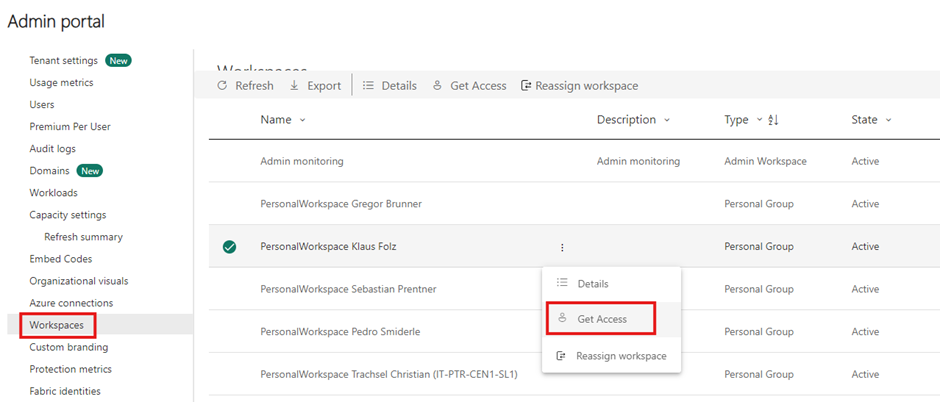
Personal workspaces of users represent a significant oversight challenge for tenant administrators. These spaces exist by default with no mechanism to prevent their creation, and their contents remain largely invisible since access authorization is complex. The admin panel offers temporary access, but only for 24 hours.
This opacity creates security vulnerabilities. Reports shared within personal workspaces could reach unintended audiences without administrative visibility.
What can we do about this?
Option 1 (Manual Approach)
Administrators can grant themselves access through the admin portal, though several obstacles exist:
Problem 1: Individual authorization is required for each personal workspace. In large organizations with hundreds or thousands of users, this process becomes prohibitively time-consuming.
Problem 2: Report downloads face restrictions. Microsoft imposes specific limitations on exporting reports to .pbix format.
Problem 3: Verifying report access and identifying sharing recipients requires separate automation solutions.
Option 2 (Measure Killer Tenant Analysis)
The Measure Killer external tool performs tenant-level scanning to reveal comprehensive details about personal workspace activities. The platform can grant administrators access to personal workspaces (using admin credentials) and analyze report contents and sharing configurations.
Key capabilities include:
- Metadata access for all reports, including non-downloadable ones
- Information retrieval on visuals, pages, and report-level measures
- Complete lists of individuals and Entra groups granted report access
- Data export functionality in .json format
- Power BI activity log integration showing views from the previous 30 days
A free trial is available to explore these features.