 Brunner BI

Unique insights into Apps and Audiences in Power BI
Apps are a great distribution method, but monitoring them at scale is hard. Learn how to get visibility into audiences, users, and consumption metrics.
 Gregor Brunner
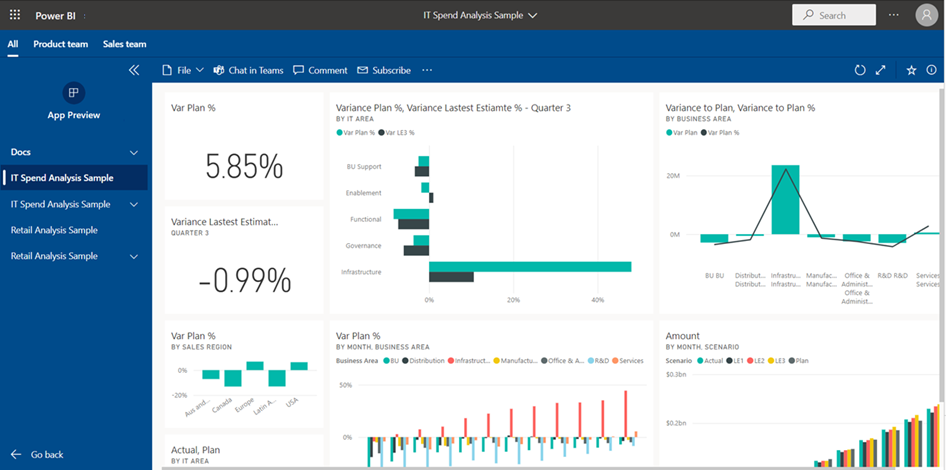
Apps represent one of the most effective distribution methods for Power BI content throughout an organization. However, monitoring App activity across an entire company requires specific tools and APIs.
Available APIs for App Management
Two primary administrative APIs are available (Fabric admin access required):
1) Admin - Apps GetAppsAsAdmin
This endpoint retrieves all Apps within the tenant along with fundamental information. Reference
2) Admin - Apps GetAppUsersAsAdmin
This API provides a complete list of users assigned to each App. Reference
Understanding Audiences
Audiences are an addition to Apps to segregate who should view content. This feature enables organizations to assign multiple reports to a single App while distributing them strategically among different audience groups. However, no dedicated API currently exists to query audience-to-user assignment data.
Measure Killer Tenant Analysis Solution
The platform’s Apps tab provides comprehensive visibility into App usage and configuration, displaying:
- Individual audiences within each App
- Report exposure per audience
- Assigned users or security groups
- Consumption metrics (opens within 30 days)
- Original workspace report names alongside App-renamed versions
This functionality proves invaluable for organizations managing numerous renamed reports, as it eliminates manual reportID cross-referencing.